How to Write a System Prompt (and Choose the Right Temperature)
A system prompt sets the rules, role and tone for an AI assistant. Learn a simple template, what to include, and how temperature changes creativity and consistency.

In this article expand_more
- What a System Prompt Does
- A Simple Template
- A Filled-In Example
- What to Include
- Common System Prompt Mistakes
- What Is Temperature?
- Other Settings to Know
- How to Test Your Prompt
- Frequently Asked Questions
- What is the difference between a system prompt and a user prompt?
- What temperature should I use?
- Can users see my system prompt?
- How long should a system prompt be?
When you chat with an AI product, there is usually a hidden block of instructions sitting before your message. That is the system prompt. It tells the model who it is, what rules to follow, and how to talk. If you are building a chatbot, a writing helper or an internal tool, a good system prompt is the cheapest way to improve quality. This guide gives you a simple template and explains the temperature setting that controls how adventurous the answers are. You can draft one with the free System Prompt Generator.
What a System Prompt Does
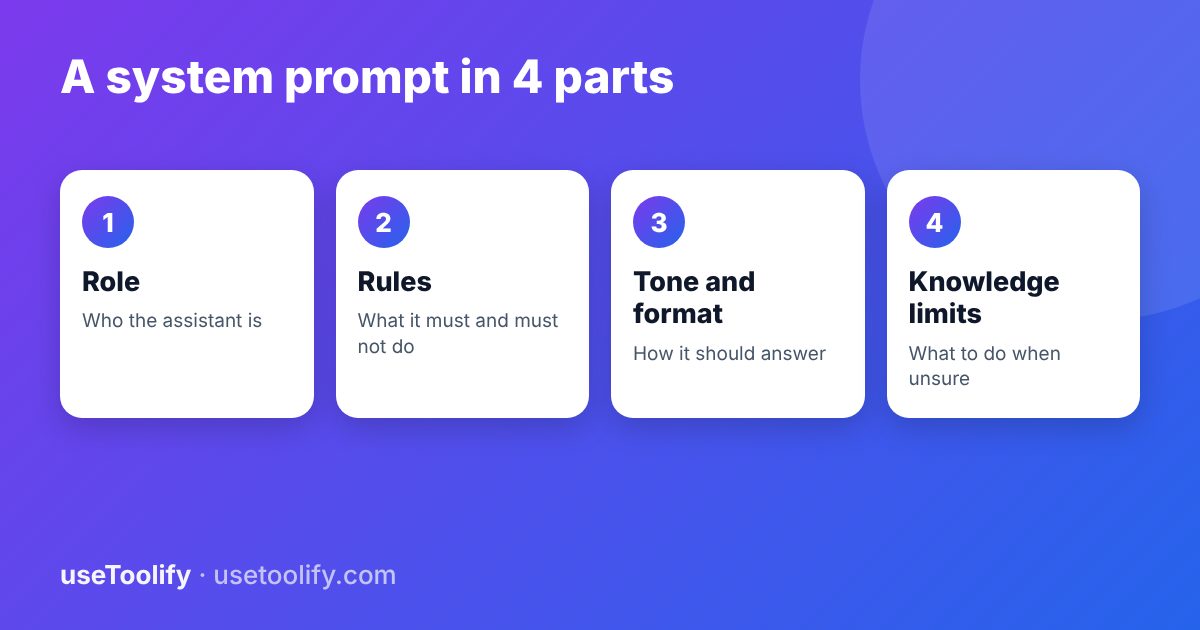
Most chat APIs take messages with roles: a system message, user messages and assistant messages. The system message is where you put instructions that should apply to the whole conversation, such as persona, rules and format. The user message is the specific request. Keeping them separate makes behaviour more consistent and easier to update.
A Simple Template
ROLE
You are [who], helping [audience] with [task].

GOAL
[What a good answer achieves.]

RULES
- [Things you must always do.]
- [Things you must never do.]
- If you do not know something or the context does not contain the answer, say so. Do not guess.

TONE AND STYLE
[Friendly, concise, formal, simple English, etc.]

OUTPUT FORMAT
[Length, structure, language, any fixed fields.]
A Filled-In Example
You are a support assistant for a small online stationery shop,
helping customers with orders, shipping and returns.

Rules:
- Use only the policy text provided below. If the answer is not there, say you will pass the question to a human and ask for their email.
- Never promise refunds or delivery dates that are not in the policy.
- Never ask for card numbers or passwords.

Tone: warm, brief, simple English. Maximum 80 words per reply.
Format: plain text, no bullet points unless listing steps.
What to Include
- Role and audience. A clear identity helps the model pick vocabulary and depth.
- Hard rules. Put non-negotiables here, such as safety limits and privacy.
- Knowledge boundaries. Tell it to answer only from supplied material when accuracy matters, and what to say when it cannot.
- Tone and length. Specific limits beat vague words like "short".
- Examples of good replies for tricky cases. See our guide on few-shot prompting.
If you want a distinct voice, the AI Persona Builder helps define one in detail.
Common System Prompt Mistakes
- Too long and contradictory. Dozens of overlapping rules confuse the model. Keep it focused and consistent.
- Only negative rules. "Do not do X" lists work worse than saying what to do instead.
- Secrets inside. Never put API keys or confidential data in a system prompt. Assume it can be extracted. See our article on prompt injection.
- No testing. A prompt that works on three easy questions can fail on real users.
What Is Temperature?
When a model writes, it assigns probabilities to possible next tokens. Temperature controls how much randomness is used when choosing among them.
- Low (around 0 to 0.3): picks the most likely tokens. Answers are consistent and focused. Good for facts, extraction, classification, code and anything that needs repeatability.
- Medium (around 0.5 to 0.8): a balance, suitable for general chat and most writing.
- High (around 0.9 and above): more variety and surprise. Good for brainstorming, slogans and creative writing, but more likely to wander or make mistakes.
The scale and the default differ between providers, and some newer models fix the value or ignore it, so check the documentation for your model. The AI Temperature Explainer shows how the setting changes outputs.
Other Settings to Know
- Top-p limits choices to the smallest set of tokens whose probabilities add up to p. Adjust either temperature or top-p, not both at once.
- Max tokens caps the length of the reply, which also caps cost.
- Stop sequences end generation at a marker you choose.
How to Test Your Prompt
- Write 20 realistic questions, including a few off-topic, rude or tricky ones.
- Run them and mark each answer as good or bad.
- Change one thing at a time, such as a rule or the temperature, and run again.
- Keep the version that fails least. Use the Prompt Optimizer for ideas on tightening wording.
Frequently Asked Questions
What is the difference between a system prompt and a user prompt?
The system prompt holds standing instructions for the whole conversation. The user prompt is the specific request in each turn.
What temperature should I use?
Use low values for accuracy and consistency, and higher values for creativity. Test on your task, since the best setting varies.
Can users see my system prompt?
Not normally, but a determined user may be able to extract it. Do not store secrets in it.
How long should a system prompt be?
Long enough to cover role, rules, tone and format clearly, usually a few hundred words. Remove anything that does not change behaviour.
arrow_back Previous
AI Agents Explained for Beginners: What They Are and How to Use Them Safely
Next arrow_forward
Few-Shot vs Chain-of-Thought Prompting: When to Use Each
Get new tool tutorials in your inbox
No spam — just new posts, occasionally.
Comments (0)
No comments yet — be the first to share your thoughts.