AI Agents Explained for Beginners: What They Are and How to Use Them Safely
AI agents don't just chat; they plan and take actions with tools. Learn how they work, where they help, what can go wrong, and simple rules for using them safely.
In this article expand_more
- Chatbot vs Agent
- The Parts of an Agent
- Where Agents Help Today
- Where Agents Struggle
- The Main Risk: Too Much Power
- Rules for Using Agents Safely
- Agents and the Web
- How to Try an Agent Yourself
- Frequently Asked Questions
- What is an AI agent in simple words?
- Are AI agents safe?
- Will agents replace jobs?
- Do I need to code to use an agent?
A year or two ago, most people met AI as a chatbot: you ask, it answers. The big shift in 2026 is the rise of AI agents, systems that can take a goal, make a plan and use tools to get things done. They are in the news for good reasons, and also for risks. This guide explains agents in plain language, what they can and cannot do, and how to use them without getting burned.
Chatbot vs Agent
- A chatbot answers a question with text and waits for your next message.
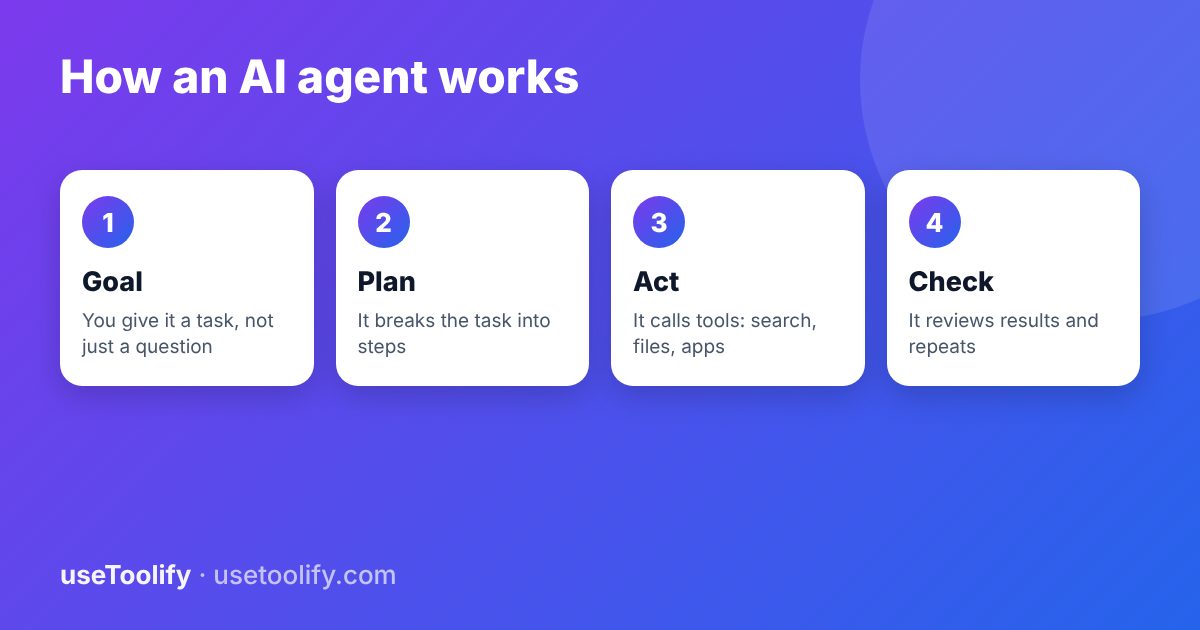
- An agent is given a goal such as "find three suppliers, compare their prices and draft an email to the cheapest". It decides which steps to take, uses tools, looks at the results and keeps going until it finishes or gets stuck.
Under the hood, an agent is usually a language model plus a loop, some tools and some memory.
The Parts of an Agent
- The model reasons about what to do next.
- Tools let it act: web search, a calculator, a code runner, file access, email, calendars, databases or other apps.
- Memory holds the task so far, notes and sometimes long-term facts about you or the project.
- Instructions in a system prompt define its role, rules and limits. Our guide to writing a system prompt covers this.
- The loop repeats: think, act, observe the result, then decide again.
Where Agents Help Today
- Research and summaries: gather information from several sources and compile it.
- Customer support: look up an order, apply a policy and draft a reply for a person to approve.
- Coding help: read a project, make a change, run the tests and fix failures.
- Data tasks: clean a spreadsheet, produce a chart, label records.
- Routine admin: sort emails, schedule meetings, fill repetitive forms.
They work best on tasks that are well defined, easy to check, and low-risk if something goes wrong.
Where Agents Struggle
- Compounding errors. A small mistake in step two can carry through everything after it.
- Hallucinations. Agents can state wrong facts or call tools with made-up inputs.
- Getting stuck or looping on ambiguous goals, which can waste time and money, since every step uses tokens. See our guide to estimating AI costs.
- Long tasks that need judgement about unclear goals or unwritten preferences.
The Main Risk: Too Much Power
The OWASP project's 2026 list of top risks for AI applications moved "excessive agency" up to third place. It describes an AI given more functions or permissions than it needs, so that a mistake, or an attack, can cause real harm. Agents are exactly where this matters, because they can send messages, change files and spend money. Add the fact that agents read untrusted web pages and emails, and you can see why prompt injection is such a concern: hidden text in a page can try to steer an agent that has access to your accounts.
Rules for Using Agents Safely
- Start with read-only access. Let the agent look and draft before you let it send or delete.
- Grant the least permissions needed. Use a separate account or a limited key rather than your main login.
- Require approval for important actions such as payments, external emails and deleting data.
- Set limits on spending, number of steps and time.
- Keep a log of what the agent did so you can review and undo it.
- Be wary of untrusted content. Avoid pointing an agent that can act on your accounts at random web pages or unknown emails.
- Check the output. Verify facts and numbers before relying on them. The Prompt Injection Detector can help you test inputs your agent will read.
Agents and the Web
Agents also change who visits websites. Cloudflare's chief executive said in mid-2026, as reported in an Ahrefs analysis, that automated traffic from bots, crawlers and agents passed 50 percent of internet traffic for the first time. For site owners, that is a reason to keep pages clear, fast and well structured, and it ties into our guide on generative engine optimisation.
How to Try an Agent Yourself
- Pick a small, low-risk task, such as "summarise these five articles and list the common points".
- Give a clear goal, the allowed tools and a definition of done.
- Ask it to show its plan before acting, and approve the plan.
- Review the result and the steps taken, and refine the instructions.
The Chain-of-Thought Builder is useful for writing the step-by-step instructions.
Frequently Asked Questions
What is an AI agent in simple words?
An AI that can plan and carry out a multi-step task by using tools, rather than only answering a question.
Are AI agents safe?
They can be, with limited permissions, approval for risky actions and monitoring. Giving an agent broad access without safeguards is where the problems start.
Will agents replace jobs?
Agents are good at routine, well-defined tasks and still need people for judgement, accountability and unclear goals. Many roles will change more than disappear, though outcomes vary by field.
Do I need to code to use an agent?
No. Many products offer agents with plain-language setup. Coding helps if you want to build custom ones.
Sources and further reading: SD Times on the 2026 OWASP GenAI / LLM Top Ten; Ahrefs: AI search trends in 2026.
arrow_back Previous
Generative Engine Optimization (GEO) vs SEO: How to Get Cited by AI Search
Next arrow_forward
How to Write a System Prompt (and Choose the Right Temperature)
Get new tool tutorials in your inbox
No spam — just new posts, occasionally.
Comments (0)
No comments yet — be the first to share your thoughts.