How to Write a Quotation Your Client Will Actually Say Yes To (With a Worked Example)
A good quotation is clear about what's included, what it costs and how long the price holds. Here's what to put in one, a fully worked rupee example with discount and GST, and the mistakes that cost small businesses jobs.
In this article expand_more
- Quotation, estimate, invoice: what's the difference?
- What to put in a quotation
- Price it before you write it
- A worked example, in rupees
- Making it in the Quotation Maker
- Mistakes that lose jobs (or money)
- Frequently Asked Questions
- Is a quotation legally binding?
- Should I include GST in my quotation?
- How long should a quotation be valid?
- Can I turn the quotation into an invoice?
- Where is my quotation saved?
Most small jobs are won or lost on the quotation. Two people can offer almost the same price, and the client picks the one whose quote they understood: what's included, what isn't, what it will cost in the end, and when they need to pay. A confusing quote invites haggling. A clear one invites a "go ahead".
This guide covers what a quotation should contain, how to price it so you're not working for free, and a complete worked example in rupees. If you want to follow along, our free Quotation Maker builds the document as you type and saves it as a PDF.
Quotation, estimate, invoice: what's the difference?
A quotation is an offer: "I'll do this work for this price, if you agree within this time." It isn't a bill, and nobody owes you money because of it. An estimate is looser, a best guess that may change. An invoice comes after the work or sale and asks for payment. If you're GST-registered, the tax invoice is the document that matters for tax, and it has its own required details.
That last point catches people out. A quotation that looks like a tax invoice still isn't one. Use the quotation to agree the deal, then raise a proper invoice when you bill. Our Invoice Generator handles the second step.
What to put in a quotation
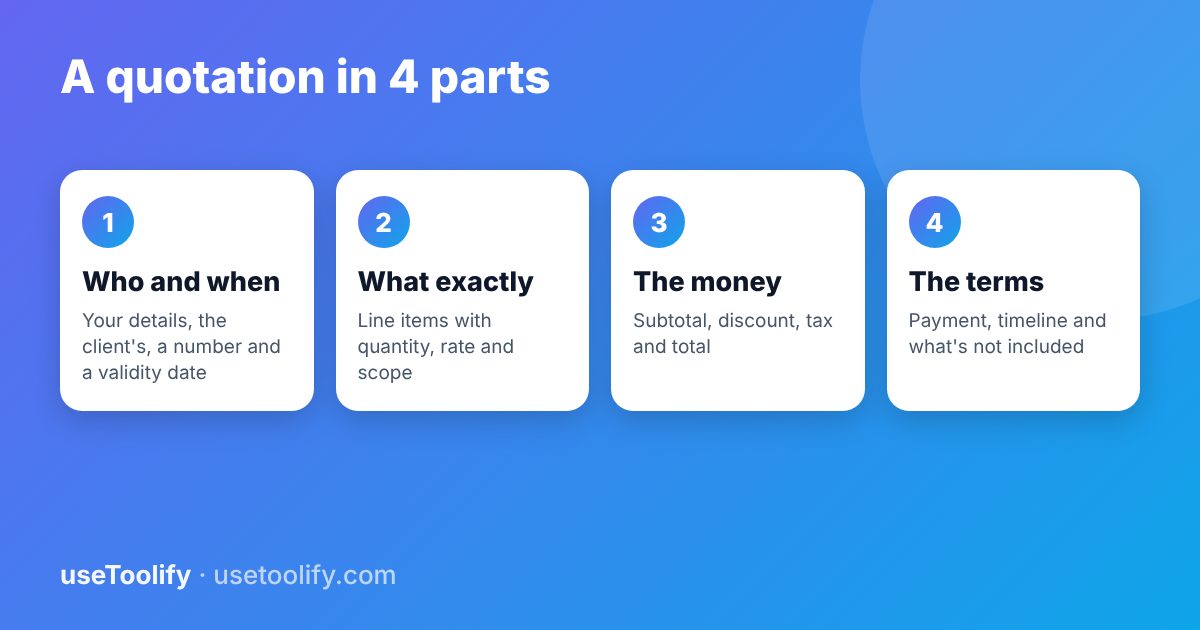
- Your details: business name, address, phone, email, and your GSTIN if you're registered.
- Client details: their name or company and address.
- A quotation number and date. Something like QT-2026-014. When a client calls three weeks later saying "about that quote", you'll know which one.
- A validity date. "Valid until 31 October" protects you if material prices or your schedule change.
- Line items: a short, specific description, quantity, rate and amount for each. "Website" is vague; "Five-page business website, mobile-friendly, contact form" is not.
- Subtotal, discount, tax and grand total, each on its own line so the client can see how you got there.
- Terms: advance required, payment due date, delivery timeline, and anything that's out of scope.
Price it before you write it
The number on the quote should come from your costs, not from a guess about what the client will accept. List what the job actually costs you (materials, travel, any help you pay for, the hours you'll spend) and decide what margin you need on top. If you're unsure of the difference between margin and markup, it's worth a five-minute read of our guide to profit margin and markup, because mixing them up is one of the most common ways small businesses underprice. The Profit Margin Calculator will tell you the selling price for any target margin.
A worked example, in rupees
Let's say you're a freelance web designer in Bhubaneswar quoting for a local clinic. The client wants a website with a few extra pages and help setting up hosting. You're GST-registered, and for this example we'll use 18% GST, which is commonly applied to this kind of IT service. Confirm the rate for your own service with your accountant.
- Website design and build (home, about, contact), 1 × ₹25,000 = ₹25,000
- Additional pages (services, doctors, timings, FAQs, gallery), 5 × ₹3,000 = ₹15,000
- Domain and hosting setup, 1 × ₹4,000 = ₹4,000
The subtotal is ₹44,000. You offer a 10% discount because it's a repeat referral, which is ₹4,400, leaving a taxable value of ₹39,600. GST at 18% on that is ₹7,128, so the grand total is ₹46,728.
If the clinic is in the same state as you, that ₹7,128 would be shown as CGST ₹3,564 plus SGST ₹3,564. If it's in another state, it's IGST ₹7,128. You can double-check any of these figures with the GST Calculator, and our post on GST inclusive and exclusive prices explains the arithmetic.
Notice the discount is applied before tax, not after. That's the usual way, and it's what clients expect to see.
Making it in the Quotation Maker
- Fill in the Company tab with your details and, if you have them, a logo and signature image.
- In the Client tab, add the clinic's details, your quotation number and a Valid Until date. The number isn't auto-incremented, so keep your own sequence.
- Add the three line items in the Items tab.
- In Settings, choose INR, set the discount to 10, the tax label to GST and the rate to 18. The tool applies one tax rate to the discounted subtotal and shows the total in words.
- Write your payment terms and exclusions in the Notes and Terms boxes.
- Click Save Draft, then Download PDF and choose "Save as PDF" in the print window.
One honest limitation: the tool shows a single tax line and doesn't have GSTIN or HSN/SAC fields. If your client needs the CGST/SGST split on the quote itself, add it in the Notes box. The proper split belongs on your tax invoice in any case.
Mistakes that lose jobs (or money)
- No validity date. Six months later the client comes back expecting the old price.
- Vague scope. "Logo design" turns into eight rounds of revisions. Say how many revisions are included.
- Hiding the tax. Quoting ₹40,000 and billing ₹47,200 feels like a trick to the client even when it's correct. Show the tax up front.
- Charging GST when you aren't registered. If you're not GST-registered, or you're under the composition scheme, don't add GST to your quote. Mention it in a line instead, for example "GST not applicable".
- No advance terms. For anything with material costs, ask for an advance and write the percentage down.
- Sending it and waiting. A short follow-up call two days later wins more jobs than a perfect PDF.
Frequently Asked Questions
Is a quotation legally binding?
A quotation is an offer. It generally becomes part of an agreement only once the client accepts it, ideally in writing, within the validity period. For large contracts, a written agreement reviewed by a professional is worth having. This article is general information, not legal or tax advice.
Should I include GST in my quotation?
If you're registered and will charge GST, yes, show it separately so the client sees the full amount. If you aren't registered, don't add it.
How long should a quotation be valid?
Fifteen to thirty days is common for services. If your costs move quickly, such as material prices, keep it shorter.
Can I turn the quotation into an invoice?
Once the job is done, create an invoice with the agreed amounts. Use the Invoice Generator and include any GST details your accountant needs.
Where is my quotation saved?
When you click Save Draft, it's kept in your browser, and also in your account if you're signed in. Nothing is saved until you click that button.
Try the tools mentioned in this article
Free, browser-based, no account needed.
arrow_back Previous
How to Crop an Image in Any Shape (Freehand, Transparent PNG)
Next arrow_forward
How to Convert PNG and WebP to JPG (and What to Do With HEIC)
Get new tool tutorials in your inbox
No spam — just new posts, occasionally.
Comments (0)
No comments yet — be the first to share your thoughts.