How to Use AI Summaries Without Getting Fooled by Hallucinations
AI summaries save time but can invent details or distort the source. Learn why it happens, a simple verification routine, and prompts that keep summaries faithful.
In this article expand_more
- What Is a Hallucination?
- Why It Happens
- How to Prompt for Faithful Summaries
- A Five-Minute Verification Routine
- When to Be Extra Careful
- Tips for Better Results
- Frequently Asked Questions
- Can AI summaries be trusted?
- Why does AI make up facts when summarising?
- How can I reduce hallucinations?
- Is a short summary safer than a long one?
Paste a long report into an AI tool and you get a neat summary in seconds. It is one of the most useful things these tools do, and also one of the easiest ways to be misled, because the summary reads smoothly even when it is wrong. Researchers have built whole benchmarks to measure how often language models produce summaries with unsupported claims, which shows the problem is real and not rare. This guide explains why hallucinations happen in summaries, how to reduce them, and a quick routine to check before you rely on one. You can try summarising with the free Text Summarizer.
What Is a Hallucination?
A hallucination is a statement the model produces confidently that is not supported by the source or by facts. In summaries it takes several forms:
- Invented details: a number, name or date that is not in the text.
- Distortion: a claim that is close to the source but changes its meaning, such as turning "may reduce" into "reduces".
- Missing context: leaving out a caveat that changes the conclusion.
- Mixing in outside knowledge: adding "facts" from the model's training that the document never stated.
- Misattribution: giving a quote or finding to the wrong person or study.
Why It Happens
A language model predicts likely text. When it summarises, it is compressing and rewriting, and it can fill gaps with what sounds plausible. It is more likely to slip when the document is very long, technical, ambiguous or contains similar-looking numbers. Details in the middle of a very long input are also easier to miss. A summary also removes context by design, so something is always lost.
How to Prompt for Faithful Summaries
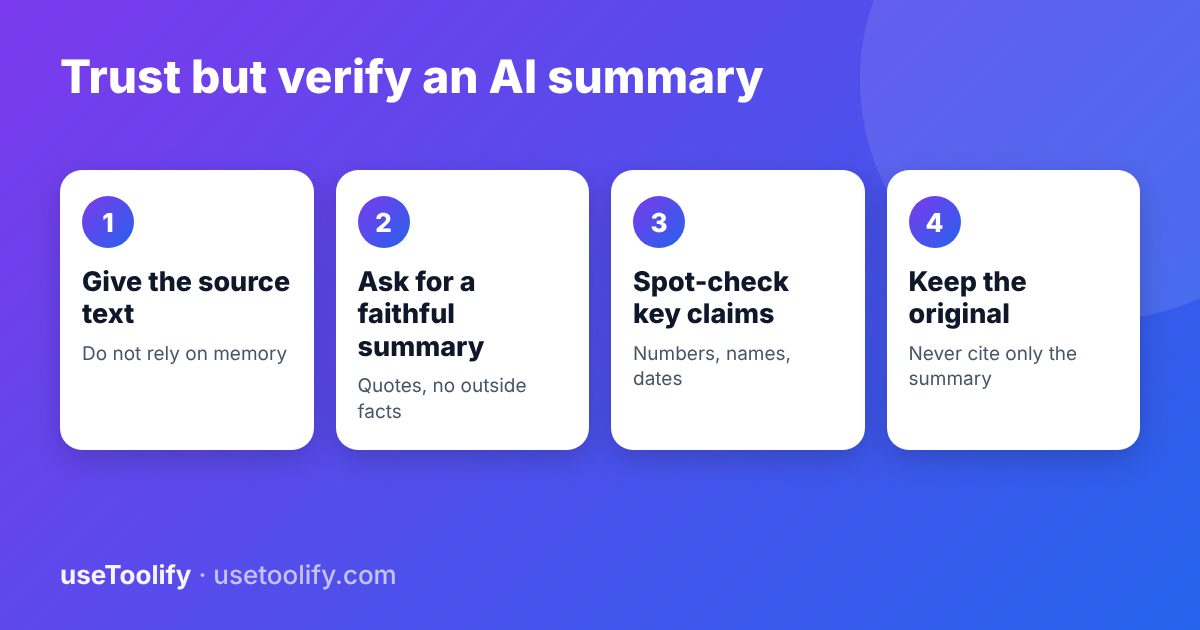
- Provide the actual text. Do not ask for a summary of a book or paper from memory, because the model may bluff.
- Tell it to use only the text. For example: "Summarise only what is in the text below. Do not add outside information."
- Allow it to say "not stated". "If something is not mentioned, write 'not stated' rather than guessing."
- Ask for structure. "Give five key points, then list every number and date that appears in the summary."
- Request supporting quotes. "After each point, include the exact sentence from the text that supports it." Quotes are easy to verify.
- Set the length and audience. A target such as "under 150 words for a busy manager" prevents rambling.
The Prompt Optimizer can help you tighten a prompt like this.
A Five-Minute Verification Routine
- Check every number, name and date in the summary against the source. Use your browser's find function.
- Read the original introduction and conclusion and see if the summary matches the main message.
- Look for absolute words such as "always", "proves" and "all". Compare them with the source's wording, which is often more cautious.
- Check the caveats. Did the summary drop limitations, conditions or uncertainty?
- Ask a second question. Ask the model "What does the text say about X?" for two or three key details, and compare with what you read.
When to Be Extra Careful
- Legal, medical, financial or safety-related documents. Use the summary as a reading aid only and read the real text, or ask a qualified professional.
- Anything you will quote, publish or send to a client.
- Scanned or messy PDFs, where text extraction errors can feed wrong input into the model.
- Documents with tables and figures, which are often handled poorly in plain-text summaries.
Tips for Better Results
- Summarise long documents in sections, then combine the section summaries and check the combined result.
- Keep the original open next to the summary.
- Check the writing quality of what you will share with the Grammar & Style Checker and Readability Analyzer.
- Do not paste confidential material into tools whose privacy terms you have not read.
Frequently Asked Questions
Can AI summaries be trusted?
They are good for getting the gist and deciding what to read closely, but they can contain errors. Verify important facts against the source.
Why does AI make up facts when summarising?
Models generate plausible text, and when compressing a document they can fill gaps with details that sound right but are not in the source.
How can I reduce hallucinations?
Give the full source text, instruct the model to use only that text, allow "not stated" as an answer, request supporting quotes and verify key claims.
Is a short summary safer than a long one?
Not necessarily. Heavy compression drops caveats and nuance, so even a short summary needs a check on the important points.
arrow_back Previous
How to Create a Strong Password You Can Actually Remember
Next arrow_forward
How to Make a Passport-Size Photo at Home (Free and Print-Ready)
Get new tool tutorials in your inbox
No spam — just new posts, occasionally.
Comments (0)
No comments yet — be the first to share your thoughts.