How to Fix Common JSON Errors and Format JSON Online
Unexpected token? Trailing comma? Learn the seven most common JSON mistakes, how to read the error messages, and how to format, compare and convert JSON quickly.
In this article expand_more
- The Rules in 30 Seconds
- The Seven Most Common JSON Errors
- 1. Trailing comma
- 2. Single quotes instead of double quotes
- 3. Unquoted keys
- 4. Comments
- 5. Missing or extra brackets
- 6. Unescaped quotes and line breaks inside strings
- 7. Values JSON does not support
- How to Read the Error Message
- Format and Minify
- Compare Two JSON Files
- Convert Between Formats
- Tips to Avoid Errors
- Frequently Asked Questions
- What does "Unexpected token" mean in JSON?
- Can JSON have comments?
- What is the difference between JSON and a JavaScript object?
- Is my JSON sent to a server when I format it?
JSON is the most common format for sending data between apps and APIs, and it is strict. One misplaced comma and a parser refuses the whole document with a message like "Unexpected token } in JSON at position 52". This guide lists the mistakes that cause nearly every JSON error, shows how to fix each, and covers formatting, comparing and converting JSON. Try the examples in the free JSON Formatter.
The Rules in 30 Seconds
- Data is a set of key and value pairs inside
{ }or a list inside[ ]. - Keys must be strings in double quotes.
- Values can be a string, number,
true,false,null, an object or an array. - Items are separated by commas, with no trailing comma.
- There are no comments.
The Seven Most Common JSON Errors
1. Trailing comma
{ "name": "Asha", "age": 28, }The comma after 28 is not allowed. Remove it. This is the most common mistake when you copy JSON out of code or delete the last item from a list.
2. Single quotes instead of double quotes
{ 'name': 'Asha' }JSON requires double quotes. JavaScript objects accept single quotes, which is why this error appears when pasting from code.
3. Unquoted keys
{ name: "Asha" }Valid in JavaScript, invalid in JSON. Put the key in double quotes.
4. Comments
{ "debug": true // turn off later }JSON has no comment syntax. Remove the comment, or keep notes in a separate field such as "_note".
5. Missing or extra brackets
Every { needs a } and every [ needs a ]. A formatter that indents the text makes unmatched brackets obvious, because the indentation will not return to the left edge at the end.
6. Unescaped quotes and line breaks inside strings
{ "quote": "She said "hello"" }Escape the inner quotes with a backslash: "She said \"hello\"". A raw line break inside a string is also invalid, so write it as \n.
7. Values JSON does not support
undefined, NaN, Infinity, dates written as new Date(), and numbers with leading zeros like 007 are not valid. Use null, a string such as an ISO date, or a normal number.
How to Read the Error Message
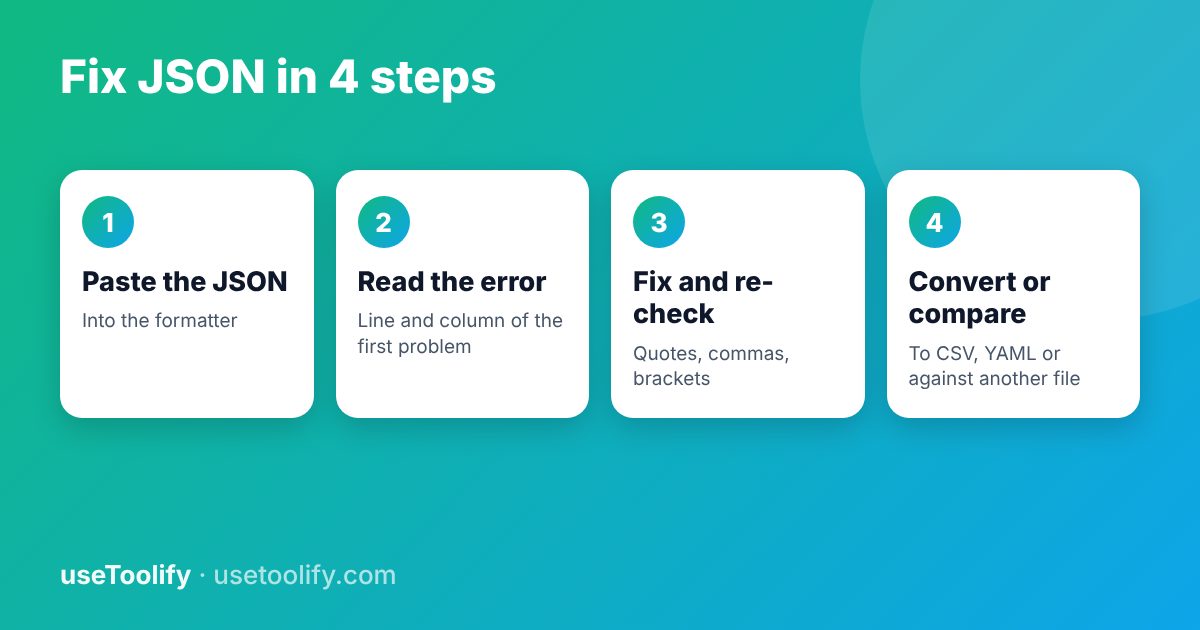
Parsers report where they gave up, not where the mistake began. If the message says "Unexpected token } at position 52", look slightly before position 52, usually for a trailing comma or a missing quote. A formatter that shows the line and column makes this faster.
Format and Minify
Formatting (pretty printing) adds line breaks and indentation so people can read the data. Minifying removes whitespace so the file is smaller to send. Format when you debug and minify when you ship. The JSON Formatter does both and validates at the same time.
Compare Two JSON Files
When an API response changed and you do not know what, a plain text compare is noisy because key order and spacing differ. The JSON Diff tool compares the data structure and shows added, removed and changed values.
Convert Between Formats
- JSON to CSV - flatten a list of objects into rows for a spreadsheet.
- CSV to JSON - turn spreadsheet rows into objects for an API or app.
- YAML to JSON - convert configuration files between the two formats.
- JSON Schema Generator - produce a schema from a sample so you can validate future data.
Nested JSON does not fit neatly in a flat CSV. Expect nested objects to be flattened into dotted column names, and arrays to be joined or expanded.
Tips to Avoid Errors
- Generate JSON with code (
JSON.stringifyin JavaScript,json.dumpsin Python) rather than writing it by hand. - Validate JSON before you save or send it.
- Keep your editor's JSON mode on, which highlights mistakes as you type.
- Do not paste secrets such as API keys into any online tool you do not trust. The useToolify formatter runs in your browser.
Frequently Asked Questions
What does "Unexpected token" mean in JSON?
The parser found a character that is not allowed at that point, most often a trailing comma, a single quote, or an unquoted key. Look just before the position in the message.
Can JSON have comments?
No. Standard JSON does not support comments. Some tools accept a variant called JSONC, but a normal parser will reject it.
What is the difference between JSON and a JavaScript object?
JSON is a text format with stricter rules. JavaScript objects allow unquoted keys, single quotes, trailing commas and functions. Convert with JSON.stringify and JSON.parse.
Is my JSON sent to a server when I format it?
Not with the useToolify JSON Formatter. It runs in your browser.
Try the tools mentioned in this article
Free, browser-based, no account needed.
arrow_back Previous
How to Remove an Image Background for Free (Clean Cutouts, Transparent PNGs)
Next arrow_forward
How to Create a Free QR Code for Your Business (Sizes, Types and Tips)
Get new tool tutorials in your inbox
No spam — just new posts, occasionally.
Comments (0)
No comments yet — be the first to share your thoughts.