The Pomodoro Technique: How to Use a Study Timer to Focus Longer
Work in 25-minute focus sprints with short breaks. Learn the exact steps, how to adjust the timing to suit you, and how to handle interruptions and distractions.
In this article expand_more
- What Is the Pomodoro Technique?
- The Classic Steps
- Why It Works for Many People
- Adjusting the Timing
- How to Handle Interruptions
- Make Your Breaks Count
- A Simple Study Plan
- When the Technique Does Not Fit
- Frequently Asked Questions
- How long is one Pomodoro?
- Can I use the Pomodoro Technique for studying?
- What if I finish the task before the timer ends?
- Do I need a special app?
If you start studying and find yourself on your phone ten minutes later, you are not lazy; sustained focus is simply hard. The Pomodoro Technique helps by turning a large, vague task into short, timed sprints. It is simple enough to start in two minutes with a free Pomodoro Timer. This guide explains the steps, how to adapt them, and how to deal with the things that usually break the routine.
What Is the Pomodoro Technique?
Francesco Cirillo developed the method in the late 1980s. He used a tomato-shaped kitchen timer, and "pomodoro" is Italian for tomato. The idea is to work in fixed blocks of focused time, called pomodoros, separated by short breaks.
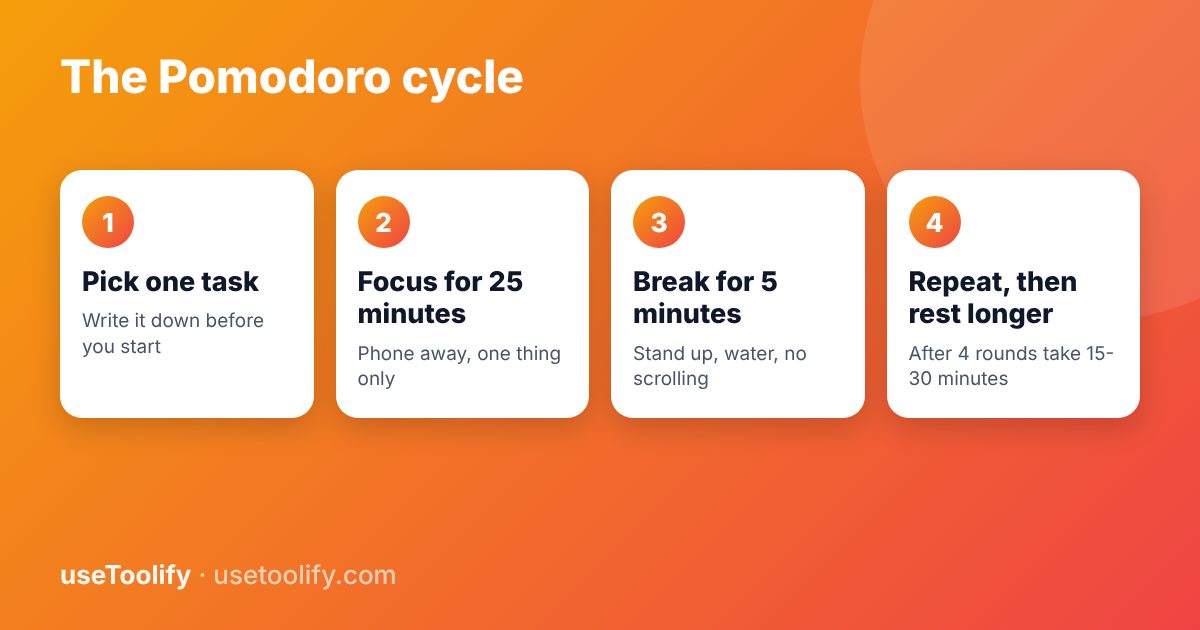
The Classic Steps
- Choose one task. Be specific: "Solve 10 physics problems" works better than "study physics".
- Set the timer for 25 minutes and work on that task only.
- Stop when the timer rings, even if you are mid-sentence. Make a quick note of where you stopped.
- Take a 5-minute break. Stand up, stretch, drink water, look out of a window.
- Repeat. After four pomodoros, take a longer break of 15 to 30 minutes.
Why It Works for Many People
- It lowers the barrier to starting. "Just 25 minutes" is easier to begin than "study all evening".
- It creates urgency. A visible countdown encourages you to make progress rather than drift.
- Breaks are built in. You rest before you are exhausted, which can help you keep going longer.
- It makes effort visible. Counting completed sessions shows progress even on slow days.
It is not magic, and responses differ between people, so treat it as an experiment and adjust.
Adjusting the Timing
Twenty-five minutes is a starting point, not a rule. Try these variations and keep what works:
- 15 minutes work, 3 minutes break - for beginners, or when you are tired or anxious about a task.
- 50 minutes work, 10 minutes break - for deep tasks such as writing, coding or maths, where 25 minutes just gets you warmed up.
- Custom cycles - the Study Timer and Interval Timer let you set your own work and rest lengths and the number of rounds.
How to Handle Interruptions
- Internal ones ("I should check my messages") - write the thought on a sheet of paper and return to the task. You can deal with it in the break.
- External ones (a person asking for something) - say "I can talk in 15 minutes", and then do so.
- A real emergency - stop the timer and treat that pomodoro as void. Start a new one afterwards.
The rule that matters most is to protect the block. A pomodoro that is interrupted every few minutes does not do its job.
Make Your Breaks Count
Breaks should rest your brain, not fill it with more input. Walk, stretch, breathe, drink water or look at something distant. Scrolling social media feels like rest but often makes it harder to return to focused work. Keep your phone out of sight during work blocks, and use do-not-disturb mode.
A Simple Study Plan
- List what you need to cover today and estimate each item in pomodoros.
- Start with the hardest task while your energy is highest.
- Mark each completed pomodoro on paper.
- At the end of the day, note how many you actually did compared to your estimate, and use that to plan better tomorrow.
For tracking time spent on a task without a countdown, a plain Stopwatch works too.
When the Technique Does Not Fit
Creative work and deep problem solving sometimes need longer unbroken stretches. If a timer keeps pulling you out of a flow state, extend the work period or turn the alarm into a gentle check-in rather than a stop sign.
Frequently Asked Questions
How long is one Pomodoro?
The classic length is 25 minutes of work followed by a 5-minute break. After four pomodoros you take a longer break of 15 to 30 minutes.
Can I use the Pomodoro Technique for studying?
Yes, it is popular with students. Pick a clear task for each session, and use breaks to rest rather than scroll.
What if I finish the task before the timer ends?
Use the remaining time to review, correct mistakes or plan the next step instead of stopping early.
Do I need a special app?
No. Any timer works. The useToolify Pomodoro Timer is free and runs in your browser.
Try the tools mentioned in this article
Free, browser-based, no account needed.
arrow_back Previous
How to Merge PDFs and Reduce PDF Size for Online Applications
Next arrow_forward
How to Convert PDF to JPG and JPG to PDF Free (Without Losing Quality)
Get new tool tutorials in your inbox
No spam — just new posts, occasionally.
Comments (0)
No comments yet — be the first to share your thoughts.